


How do I enable sound in the PokerStars desktop software?
How do I turn on the sound in the PokerStars desktop software?
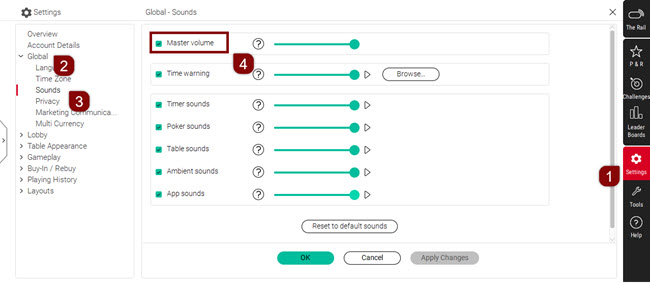
To enable sound:
- Open the menu bar and select 'Settings'.
- Select 'Global'.
- Choose 'Sounds'.
- Ensure there is a tick next to 'Master volume'.
You can preview individual sound effects on the list and exclude any you don't want to hear.
Screenshot of the Settings screen showing numbered steps to enable the sound
What if the sound is still not working?
If sound is still not working after enabling 'Master volume', check your device's system audio settings.
What should I check on my device?
Check the following:
- Your device's volume is turned on.
- The PokerStars application is not muted in your system audio settings.
- Your speakers or headphones are connected and working.
Where can I find device-specific audio troubleshooting steps?
For detailed troubleshooting steps specific to your device, search for audio troubleshooting guides on your operating system's official support website.
Did you find this article useful?
Related Articles
- PokerStars log-in alert: "You are already logged in from another computer...."
- Complete an interrupted game
- How do I get free Play Money chips?
- Casino and live game history
- Instant Bonus and Race points (Casino)
- All you need to know about the SMS login feature
- Available support languages
- Casino Race point system
- Playing abroad and in UK
- Chests in PokerStars Rewards